
Getting Started with Flows
Create multi-page experiences like onboarding flows, cancellation surveys, and more. All within the same Superwall editor you're familiar with.
Flows let you string together multiple pages into a single, seamless experience. They're ideal for onboarding, cancellation surveys, upsells, or any multi-step journey. They're built right into the same editor you use for paywalls.
Visual learner? Watch our Flows walkthrough on YouTube (coming soon).
Use cases
Flows are built to work well for any multi-step experience:
- Onboarding flows that branch based on user goals or preferences.
- Cancellation surveys with conditional paths based on feedback.
- Multi-step upsell funnels that guide users to the right product.
- Personalized welcome experiences tailored to user segments.
Familiar with paywalls?
If you've built paywalls in Superwall, you'll be right at home with Flows. They use the same editor, with some key enhancements added:
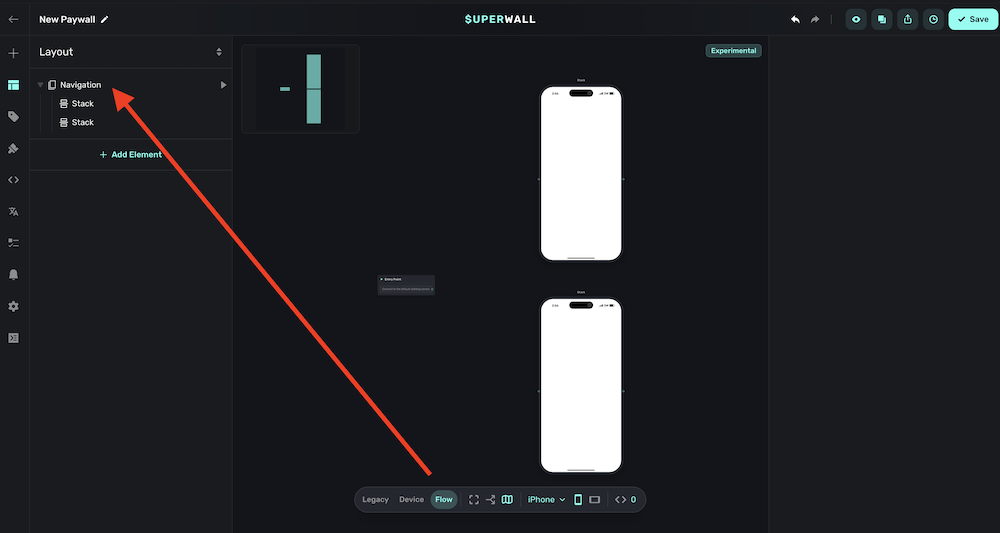
- You'll use the Navigation element to connect pages together.
- The Canvas view lets you see your entire flow at once.
- Routes define how users move between pages, including conditional branching.
Once you add a navigation component, a new option called "Flow" becomes available in the floating toolbar:
How is this guide?
Edit on GitHub